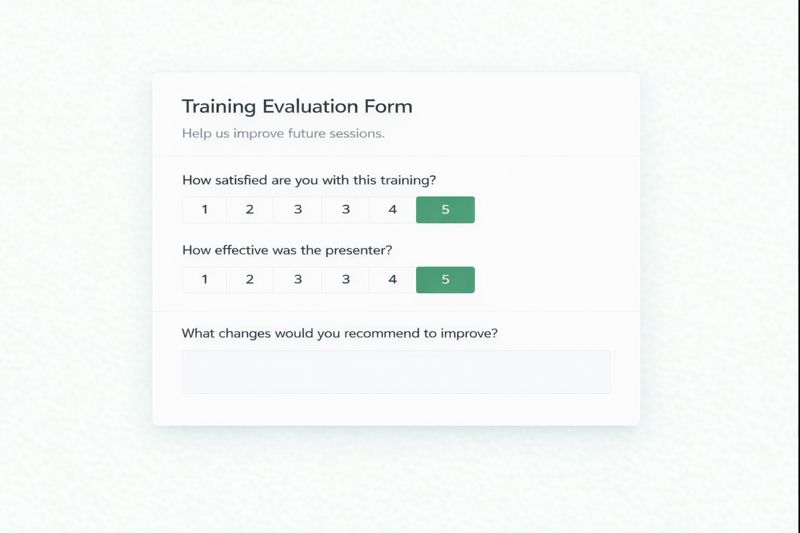
Use this training evaluation form to collect feedback after a training session, course, or workshop. Measure satisfaction, effectiveness, and content quality to identify opportunities for improvement. Designed for HR teams, trainers, consultants, and organizations running internal or external training programs.
The sample questions and guidance here serve as a training evaluation toolkit, allowing you to create a form tailored to your program. It summarizes commonly used evaluation elements, guidance on questions, and tips for analyzing results, including benchmarking. The table below includes variations of the form.
| Form Option | Description | When to Use |
|---|---|---|
| Online template | An online version to collect responses and summarizes results automatically. | Electronic feedback. Ideal for large audiences. |
| Online preview | Preview how the online version appears to participants. | Helpful to understand an online form. |
| PDF Document | Printable training evaluation form. | Brainstorm questions and collect feedback from small groups. |
| Word Document | Editable training evaluation form. | Customize questions and create a new PDF. |
Training Evaluation Form Sample Questions
Below are the questions included in this training evaluation form, followed by additional example questions you can use.
Core Training Evaluation Questions
- Overall, how satisfied were you with this training session? (Rating scale)
- How effective was the presenter in delivering the material? (Rating scale)
- The training content was useful. (Agreement scale)
- Participation was encouraged. (Agreement scale)
- The materials provided were helpful. (Agreement scale)
- The presenter was knowledgeable. (Agreement scale)
- The training facilities were adequate. (Agreement scale)
- Do you expect to apply at least one concept from this training? (Yes / No)
- What part of the training helped you learn most effectively? (Open-ended)
- What changes would you recommend to improve this training? (Open-ended)
The questions begin with standardized rating scales to support consistent comparison across sessions, programs, or time periods. A short yes/no question assesses whether the training was applicable beyond the session, while open-ended questions capture qualitative feedback to guide improvement.
Depending on your goals, you can include additional questions in your training evaluation form, organized by the metric you want to measure.
Content Assessment
Use these questions to evaluate relevance, clarity, and coverage.
- Was the training content relevant to your role? (Rating scale)
- How well did the training meet its stated goals? (Rating scale)
- Was the material too basic, too advanced, or just right? (Multiple choice)
- Was enough practical information provided? (Yes / No or rating scale)
- What additional topics would you like covered in future sessions? (Open-ended)
In the sample template, content quality is measured using agreement-based ratings (such as usefulness and materials provided) to ensure consistent, comparable results.
Instructor Assessment
These questions focus on delivery and subject-matter expertise.
- How clearly did the presenter explain the topics? (Rating scale)
- Did the presenter keep participants engaged? (Rating scale)
- How well did the presenter answer questions? (Rating scale)
- What were the presenter’s strengths? (Open-ended)
- What could the presenter improve? (Open-ended)
The sample template includes standardized ratings of presenter effectiveness and knowledge, allowing results to be benchmarked across sessions.
Learning Experience
These questions help identify environmental, logistical, or engagement-related factors.
- How would you rate the training environment (room, technology, or virtual platform)? (Rating scale)
- Was the session length appropriate? (Yes / No)
- Was it easy to stay focused throughout the session? (Rating scale)
- What part of the training, if any, was confusing? (Open-ended)
In the sample form, environment and facilities are captured with a single agreement-based rating to reduce survey fatigue while still identifying potential issues.
Application of Material
These questions assess real-world usefulness beyond the session itself.
- Do you expect to apply at least one concept from this training? (Yes / No)
- When do you expect to apply what you learned? (Immediately / Within a few months / Not applicable)
- What challenges might prevent you from applying these skills? (Open-ended)
- What resources or support would help you apply what you learned? (Open-ended)
- What additional training would be helpful? (Open-ended)
In the sample template, a simple application question is paired with open-ended feedback to measure applicability without overloading respondents.
Skill Assessment
These questions are helpful when training outcomes directly affect job performance or service delivery.
- How would you rate your skill level related to this topic before the training? (Rating scale)
- How would you rate your skill level associated with this topic after the training? (Rating scale)
- How confident do you feel providing services or support related to this topic? (Rating scale)
These questions are commonly used in consulting, healthcare, and systems training, where participants are expected to apply skills on behalf of an organization or train others.
Knowledge Sharing
These questions evaluate broader organizational impact.
- Are you prepared to support or train others on this topic? (Yes / No)
- Will this training help improve your team’s performance? (Rating scale)
- Who else would benefit from this training? (Open-ended)
These questions are most relevant in enterprise or regulated environments where knowledge is expected to cascade beyond the initial training session.
Training Evaluation Form Use Cases
Training evaluation forms can be used across a wide range of training formats and goals. The examples below show how the same core structure can be adapted for different training scenarios.
Employee training evaluation
Use this form to measure whether employee training was relevant, effective, and applicable to daily work. Benchmark satisfaction and usefulness scores across departments or time periods to identify which programs deliver real value versus those that need improvement.
Compliance and mandatory training
For compliance, safety, or policy-driven training, evaluation forms help confirm clarity, engagement, and readiness to apply required procedures. Simple benchmark questions combined with an application check can highlight gaps before they become risks.
Train-the-trainer evaluation
When evaluating instructors or facilitators, this form helps isolate presenter effectiveness from course content. Standardized presenter ratings make it easier to compare trainers and identify coaching or development needs.
Workshop and corporate training programs
For workshops, seminar presentations, or technical training sessions, evaluation forms help measure participation, engagement, and usefulness. Open-ended feedback is valuable for refining session structure, technical clarity, and training effectiveness.
Common programs include:
- Accounting polices
- Construction WIP reporting
- Excel and VBA workshops
- ERP training programs
Training platform or LMS usability evaluation
When training is delivered through an internal platform or learning management system, evaluation forms can be adapted to assess usability and delivery quality. Research questions can be included to measure ease of navigation, clarity of materials, and whether the platform supports or hinders learning.
Leadership training and curriculum evaluation
For leadership or skills-based programs, evaluation forms help determine whether learning objectives were met and whether participants feel prepared to apply new concepts. Tracking results over time supports curriculum refinement and long-term program effectiveness.
Courses and certification programs
For formal courses or certification-based training, evaluation forms help balance instructional quality with learner outcomes. Benchmarking across cohorts can reveal trends in satisfaction, difficulty level, and real-world applicability.
Training Evaluation Form Design
To write an effective training evaluation, combine quantitative metrics with open feedback to get the whole picture. Here are three tips on how to design a successful training feedback form:
Clarify what you’re trying to learn
Before you start writing questions, ask yourself: “What do I want to know from this form?” Are you evaluating content relevance, instructor effectiveness, knowledge transfer, or all of the above?
When objectives are clearly defined, question development becomes more focused and results more actionable. Here are three common goals:
- Was the content relevant?
- Did the instructor explain things clearly?
- Can participants apply what they learned?
Once you’re clear on that, it will be a lot easier to write the form itself.
Include the right questions
Start with questions that directly tie to your training objectives. If your session aimed to improve customer service skills, ask participants to rate their confidence in handling complex customer interactions before and after the training.
Some quantitative question types you can use:
- 1-5 Rating scales – Perfect to measure satisfaction, engagement, and effectiveness of the training program.
- Multiple choice questions – Useful for quick yes/no or selecting from options.
- Open-ended text – Great to ask for ways to improve or what skills were most valuable
Rating scales should be the quantitative backbone of your evaluation.
A 5-point scale works well for most training contexts. Participants can easily distinguish between “strongly disagree” (1) and “strongly agree” (5) when rating statements like “The training content was relevant to my job responsibilities” or “I feel confident applying these skills in my work.”
Be careful when you label your points. Make sure they’re easy to understand:
1 – Strongly Disagree / Very Poor
2 – Disagree / Poor
3 – Neutral
4 – Agree / Good
5 – Strongly Agree / Excellent
On SurveyKing, the five-point rating scale lets you label the left and right anchors while keeping the form simple, mobile-friendly, and easy to complete. If you want each point labeled, a matrix question is a better fit.
Five-point rating scales are the easiest way to benchmark results and measure training effectiveness over time. Later in this article, we’ll take a deeper dive into how benchmarking works.
Qualitative questions to include:
- Open-ended questions – Let people explain their thoughts in their own words.
- Comment boxes for additional notes – Add one after a rating question so people can explain why they gave that score.
SurveyKing includes natural language processing (NLP) for open-ended answers. When participants provide suggestions for improvement, the system automatically categorizes responses and generates a few summarized themes.
If you ask, “What aspects of this training will be most valuable in your daily work?”, the system will group similar answers and flag the areas of training that matter most to your team.
Keep the survey simple
Start with a general satisfaction question, follow with a few focused questions about the training, and end with an open-ended prompt for comments. Use a short form whenever possible, group related questions together, and keep wording direct so the survey is quick to complete and responses are easy to analyze, spot issues, and act on.
Collecting Training Form Responses
For maximum accuracy and completion rates, distribute training feedback forms immediately after sessions while experiences remain vivid. For multi-day programs, you can conduct daily pulse surveys to capture immediate reactions and a comprehensive evaluation upon program completion.
Consider these distribution approaches:
QR Codes
QR code surveys are a great way to collect training feedback because they provide a low-effort and straightforward method for participants to access feedback forms instantly.
By embedding QR codes directly into training materials, trainers make it easy for attendees to scan and respond in real time. This will increase response rates by making feedback submission convenient, while maintaining a fresh training experience.
You add a QR code linking to the form:
- At the end of your slide deck (the final slide)
- On printed handouts
- In digital resource packages
Survey Links
Sharing a survey link is another way to collect feedback is by sharing a single survey link. This link can be reused across multiple channels, making it easy to include in training materials, handouts, and post-session communications without managing various versions of the form.
You can share the survey link through:
- training slide decks or closing slides
- printed handouts or QR codes
- internal portals or learning management systems (LMS)
- follow-up emails or calendar invites
Emailing the survey link is one of the most practical and effective approaches, especially when it’s sent shortly after the session while the experience is still fresh. Sending the link within 24 hours typically results in higher response rates, and one or two brief reminders can help capture additional feedback. Keep the message short and mobile-friendly, with a clear subject line such as “Quick feedback on today’s training.”
You can also embed the first rating question directly into the email. This allows participants to submit at least one response with a single click, even if they don’t complete the full survey. Embedded questions reduce friction and ensure you still collect valuable benchmark data. On SurveyKing, this email embed functionality is available with enterprise plans.
For instructor-led or corporate training sessions, the same survey link can also be shared live. Displaying the link or a QR code on the final slide, posting it in chat, or embedding it into a virtual training platform’s closing screen allows participants to respond immediately while they’re still engaged.
Training Evaluation Form Response Data
Summary counts and scores can indicate how well a specific training was conducted. But to uncover real insights, you need to go deeper. Segmenting responses by key variables helps reveal patterns, isolate weak spots, and highlight opportunities for improvement.
If possible, break down training feedback form responses by:
- Training type – Compare effectiveness across delivery methods (in-person, virtual, self-paced).
- Session date and time – Identify whether scheduling impacts engagement and satisfaction.
- Instructor – Spot coaching opportunities and recognize exceptional trainers.
- Participant demographics – See if training resonates differently with various roles, departments, or levels of experience.
As discussed in the design section, background information like session, instructor, or training type can often be pulled automatically from your system. Whether captured that way or collected directly in the survey, be sure to use these variables in your analysis to segment results and reveal meaningful patterns.
Viewed this way, the results become much more actionable. For instance, if one module consistently underperforms across all instructors, the content itself likely needs revising. Or if an instructor receives lower ratings regardless of the module or compared to other instructors, that points toward coaching or facilitation improvements.
Training Evaluation Benchmarks
Without context, training feedback data exists in a vacuum. Benchmarking provides the comparative framework needed to interpret results meaningfully.
Internal benchmarking
For internal benchmarking, track your training feedback results over time to:
- Establish baseline performance metrics
- Measure improvement (e.g., after revising part of a workshop)
- Check if effectiveness dips during certain times of the year
- Set realistic performance targets
We recommend setting internal benchmarks after your first few training surveys, then updating them annually. This creates consistent data points and makes it easy to understand how program changes affect results over time. For storage and analysis, work with IT to upload the data into an internal database with clean date formatting for reliable reporting.
If you’re using SurveyKing, our dashboards can visualize these benchmarks, allowing you to track trends and compare results across sessions or teams. If your team prefers working in Excel, we offer Excel consulting services to automate this process, including data cleanup, standardized tables, and annual benchmark updates.
External benchmarking
You can also compare your training evaluation results against industry standards to:
- Benchmark against competitor averages
- Use industry norms to guide improvement goals
- Identify areas of training excellence
- Prioritize areas needing improvement
- Set internal targets based on best-in-class results
On the SurveyKing platform, external benchmarks are aggregated anonymously and refreshed throughout the year. Each dataset includes details such as the number of responses and the most recent refresh date, giving you transparency into how current and representative the benchmarks are.
The template in this article includes two benchmark questions. These questions allow you to compare your results with other organizations automatically:
- Overall, how satisfied were you with this training session?
- How effective was the presenter in delivering the material?
Frequently Asked Questions
The questions below cover common considerations when creating and using training evaluation forms, including what to ask, how long the form should be, and how to collect feedback effectively after a training session.
What is a training evaluation form?
It’s a form used to collect structured feedback after a training session, course, or workshop. It helps measure participant satisfaction, trainer effectiveness, and content quality. Modern training evaluation forms are typically delivered online, allowing responses to be collected quickly and analyzed more efficiently than static PDF or paper forms.
What questions should a training evaluation form include?
Include a question about overall satisfaction first, followed by trainer or instructor effectiveness ratings and a multiple-choice question about whether participants can apply what they learned. The form should also include one or two open-ended questions asking what participants found most valuable and what could be improved.
How many questions should a training evaluation form have?
The most effective training evaluation forms include fewer than 10 questions. Rating scale questions provide simple, consistent data that can be benchmarked internally and externally, while open-ended questions allow participants to share specific suggestions or insights. Using a small number of focused questions improves response rates and produces more actionable results.

Ready To Start?
Create your own survey now. Get started for free and collect actionable data.